
If your organization runs on Microsoft 365, you should consider how to use the AI work assistant Copilot to save your teams time and effort, following best practices:
Copilot for Microsoft 365 is a productivity system powered by two forms of artificial intelligence (AI):
Copilot for Microsoft 365 seamlessly combines these elements with your company's data, context and existing security infrastructure within the Microsoft 365 ecosystem.
To succeed with Copilot for Microsoft 365, you’ll want to change how you think about work and how your organization gets work done. With major technology shifts like AI, effective change management is necessary to help your team establish the right behavioral patterns and habits. Effective change management helps demystify AI and build familiarity with how it works so there are fewer barriers to your success.
Most employees have never written a line of code before and the good news is that coding isn’t necessary to make the most of the AI revolution. Although you don’t need coding knowledge, your staff will need to learn how to write prompts and know how and when to use AI “agents”, which are programs created to perform set tasks automatically. For example, you can build a customer service chatbot that uses training data to interact with customers directly with support from human team members on more challenging inquiries.
While agents play an important role in AI, many organizations rush into creating them instead of taking the time to create the right prompts and workflows. If the foundation is weak, the automation will deliver weak results at scale.
In this guide, we’ll share some practical tips on how you can avoid some of the pitfalls and move your Copilot implementation far past a procurement decision. You’ll learn:
Research shows that AI deployments often fail to meet company objectives and that picture isn’t improving. An S&P Global Market Intelligence survey of companies in North America and Europe found that organization-wide adoption of generative AI grew from 13% to 27% from 2024-2025, but the percentage of companies abandoning most of their AI initiatives between proof of concept and broad adoption rose from 17% to 42% year over year.
The issues stem from bad planning – not AI itself. To start with AI in your organization, you need a formal, planned implementation process where you roll out AI intentionally with your team, provide training, set expectations and develop guardrails.
Your AI implementation won’t succeed because you buy licenses and provide access, but because you set clear expectations, provide effective user training and use change management in guiding your organizational culture around how the technology is used.
AI for business can change workflows, internal processes, role functions, expectations and how jobs look day to day for your team. With these massive shifts, a more strategic approach is necessary to minimize pain for your team and ensure you’re maximizing your investment.
Many see AI as just another product for techies or enthusiastic tech salespeople. Don’t let your implementation become another thing users ignore after trying it once and moving on. You need to put your long-term strategy for M365 Copilot ahead of novelty, so the use cases and applications are clear immediately.
Here’s a list of common mistakes to avoid:
Give your team a chance to learn and onboard M365 Copilot in a community setting where they can share skills, get faster buy-in and share excitement about progress. Assemble a small, hand-picked group of inquisitive users from across multiple departments to participate in your pilot group. The initial pilot testers are typically high M365 users and excited about automation and technology in general.
Your pilot group needs education on prompt writing and, ideally, a real problem that Copilot can solve that serves a business need. Employee needs and use cases are going to be different depending on roles. Business users could use M365 Copilot to summarize documents and IT users need it for writing code.
Focus your pilot group(s) on quick wins that demonstrate value, such as:
Prompt engineering is the process of designing and refining instructions (prompts) given to an AI model to get a desired output. With this practice, you aim for specific outputs as your goal, experimenting with the instructions you use to generate better results through follow-up questions, rewriting your prompts and providing better context to get better answers from M365 Copilot.
After you start a new prompt, you create a better version with adjustments based on your results, until you get the results you want. This is called “iteration”. Teach your pilot group prompt engineering basics and then help them strengthen their skills in a group context with others, if possible, so they can master the nuances of giving AI clear instructions and context.
We advise you to focus on these three areas of prompt engineering best practices: Role, Context and Constraint. Every prompt should prepare Copilot for success, with effective instructions and clear explanations of what strong output should look like. Based on output, tweak the prompt to improve your results.
Role. Tell Copilot who it should act like: a financial analyst, a customer, a business partner or another character. Give as much detail as you’d like: company demographics, title, industry and anything else that could be helpful.
Context. Give Copilot information to use for executing the prompt, including attachments, file names or other sources. You could also copy and paste text in with your prompt. Without specific context, Copilot may use training data available to it instead and return the wrong information. Attaching a pricing spreadsheet and asking questions about its information, for example, tells Copilot not to look just anywhere as it writes output, leading to more specific results.
Constraint. Copilot needs rules to follow as it prepares your output. Your prompt should clearly explain what you want from the output and anything specific about how Copilot should follow your instructions. For example, you could ask for a one paragraph summary, 100 words or less, of the quarterly report, written in simple language without jargon. Asking for 100 words or less is a constraint on output that keeps Copilot from returning a longer answer. Together with the other constraints such as simplified language, Copilot knows more about what quality output should look like for your prompt.
Example: How to prompt a financial report summaryBased on best practices, consider how the second of these two prompts is a better start.
Weak Prompt: “Summarize this report.”
Strong Prompt: “Write three paragraphs explaining the variance drivers in 2025’s Q3 report compared with Q3 in 2024. Use plain language without jargon. Answer as a financial analyst in the manufacturing industry would.”
Although the second prompt will probably still require more refinement to get the results you’re looking for, it’s a lot more useful, specifying the data to use, tone and voice you’re looking for in Copilot’s output.
You can take this further by attaching an example and asking Copilot to match the format and tone or include an example of what to leave out: “Avoid topics already discussed in the attached onboarding guide.”
If you are unsure how to write your prompt, ask Copilot to interview you by asking questions to help it understand the format you’re looking for. For example, “I’m writing an Instagram story and need ideas. Ask me one question at a time to help me find the right tone and angle.”
High-volume, repeatable workflows that need consistent outputs are the best-use cases for building AI agents (programmed assistants). But we’ve seen too many organizations jump into using agents before mastering the basics of prompting, leading to disappointing results.
These new agents then are not fully tested and optimized for the processes they undertake and for the results their designers need. Encoding the wrong instructions in a Copilot agent can be even worse than doing the original task manually. Repeatable processes that are incorrectly designed end up extending and mass-producing errors. Unable to fix errors, the agent will repeat the errors in process or prompt design and create lackluster output.
Instead, focus on building prompting expertise throughout your organization first. Have your pilot group build their proficiency in prompting and start thinking of problems they could solve more effectively with help from M365 Copilot. When you identify processes that you can refine and then automate, repeatedly improve on the prompt until it’s ready for broader use as part of a workflow. You should test agents internally with different training data, contexts and inputs that are likely to happen when you roll them out for real-world use before using them to replace an existing process.
Prompt vs. agent quick guide:Depending on your needs, your new process with M365 Copilot may rely primarily on prompting or on an agent designed to use prompts and context you choose.
| When to Use Prompts | When to Build Agents |
|---|---|
| Exploratory tasks | High-volume repeatable workflows |
| Varied or context-rich tasks | Consistent outputs required |
| When human judgment matters | When rules and structure are stable |
You get more from M365 Copilot if you use it to support and streamline your use of technology and information instead of as another app. Your pilot group can start testing prompt patterns they’ve identified within existing workflows in their functional areas. Together, you can identify places M365 Copilot could reduce friction for employees or improve efficiency. M365 Copilot is built on OpenAI’s ChatGPT model within the Microsoft ecosystem of products. It connects to your Office applications and brings your data together using your organization’s existing infrastructure (Microsoft Graph). With custom development tools (M365 Copilot Studio), you can also build custom agents to interact with other applications and automate workflows across platforms.
Integrations give you even more uses for Copilot:
As you expand beyond your pilot group, you’ll likely start encountering different mindsets and varying tech savvy. Pilot volunteers are typically highly motivated. The broader organization may benefit from different levels of support and guidance.
During your initial rollout, you may emphasize quick wins and experimentation by keeping governance relatively simple and minimal while your organization tests out AI. When your pilot project is complete, address security, compliance and data concerns so your organization is ready to establish M365 Copilot use in your workflows.
Over time, create prompting templates, test and share what you develop with M365 Copilot and available integrations to expand your AI’s relevance as a virtual assistant.
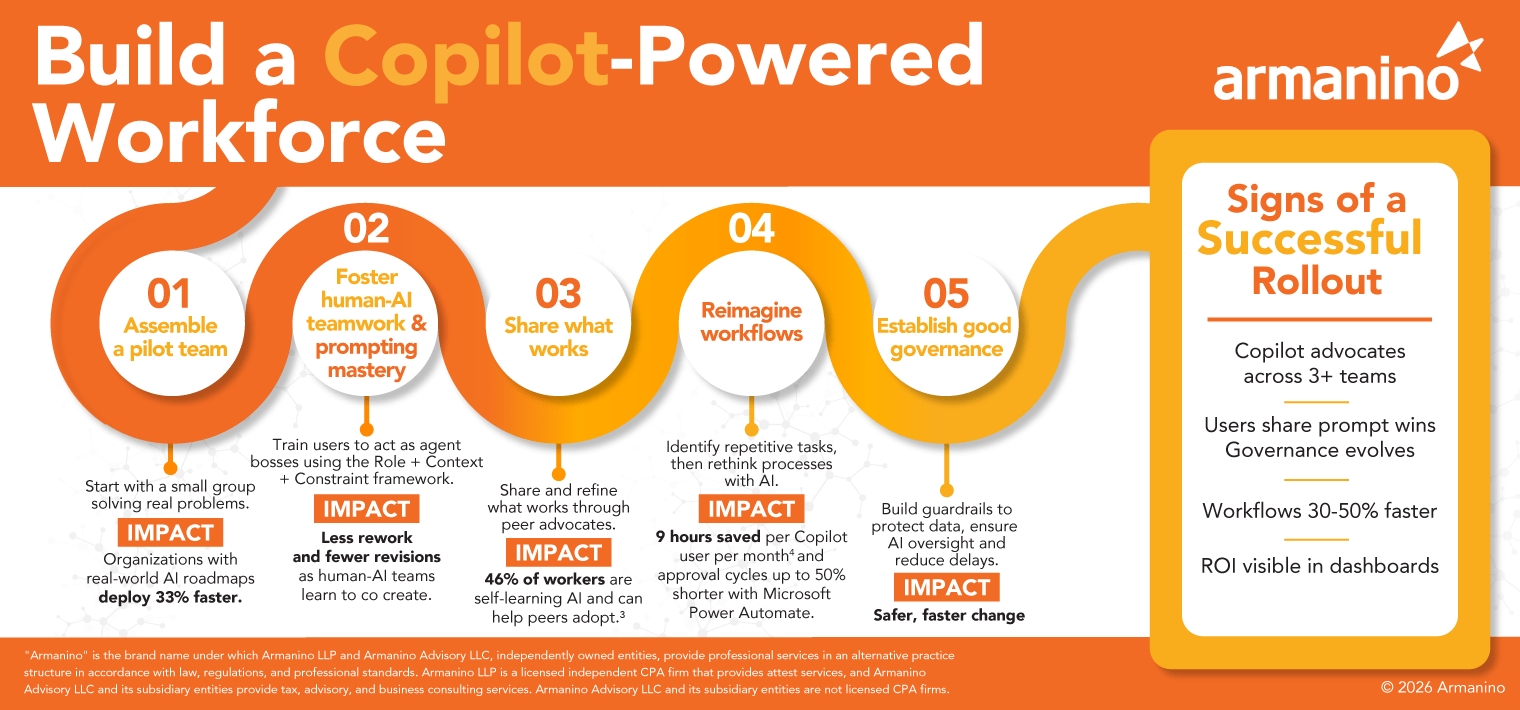
Want to display this infographic on your site? Copy and paste the following code. Be sure to include attribution to armanino.com with this graphic.
M365 Copilot’s analysis, information synthesis, model creation and calculation capabilities provide opportunities for leaders to test out AI in varied workflows. Using Copilot, you can also plan scenarios, map relationships and research past data.
Here are some examples of how M365 Copilot offers value in various industries:

Beyond writing job descriptions and ads, Copilot can conduct sentiment analysis on employee feedback, help you develop retention strategies and help with organizational development.

With Agent mode in Excel, you can build financial models, run multi-step analysis and ask complex questions. Copilot is capable of more in Excel than ever and can help you refine your work.

Nonprofit organizations can tackle grant writing and content creation, shortening the time spent in research and gathering materials together.

Leaders can analyze inventory management, supply chain planning and routing processes to identify opportunities for improvement.
Success with M365 Copilot requires the right mix of curiosity and willingness to experiment to find the right prompts and refinements. Changing work habits, building community around prompting education and integrating Copilot into your workflows helps you scale beyond standalone AI and maximize your return on investment.
Artificial intelligence can be transformative if you know how to use the technology effectively, avoiding common implementation mistakes that lead to failure and waste time. Whether you’re preparing to roll out Copilot for the first time or scaling up, Armanino’s Microsoft Copilot experts can help you become an AI success story. As part of the Microsoft Inner Circle for more than a decade, we can assess your current Microsoft setup and show you how Copilot can help you cut complexity, automate tasks and accelerate growth.
Let our M365 experts assess your Microsoft setup and show you how Copilot can help you cut complexity, automate tasks and accelerate growth.