
ERP Selection Guide: 10 Steps to Choose the Right Solution for Your Business
Article

ERP Selection Guide: 10 Steps to Choose the Right Solution for Your Business

November 19, 2025

Investing in the right enterprise resource planning (ERP) software is key to driving future growth and transforming the way you do business. By integrating core functions ― from supply (manufacturing, operations, and personnel) to demand (sales, service and fulfillment) ― modern ERP software provide a single source of truth. Equipped with AI and automation, they streamline workflows, reduce manual tasks and boost efficiency across finance, HR and supply chain processes, all while supporting scalability.

However, not all ERPs are created equal. Choosing the right one can feel overwhelming, with many factors to weigh for the best fit and ROI. This guide simplifies the process with a 10-step ERP framework to help you evaluate and select the ideal ERP. Here’s what to expect:


Step 1: Clearly Define Your ERP Needs

Before diving into enterprise applications like Sage Intacct, NetSuite, Microsoft or Workday, take the time to clarify your specific needs. Don’t overlook this phase! Addressing these early steps will ensure a more effective, efficient selection process. Work through these core areas:

  1. Fit and functionality. What does your business need now ― and in the future? Each ERP has its own unique strengths, so aligning those with your business requirements is key.
    For example, Sage Intacct and Workday are highly focused on core finance and accounting, with Workday extending to better serve service-based organizational needs. NetSuite, Microsoft Dynamics 365 Business Central and Microsoft Dynamics 365 Finance & Supply Chain (FSC) offer more comprehensive solutions for broader enterprise needs like supply chain, inventory and manufacturing.
    Business complexity often drives ERP selection. While many larger have multiple entities, global operations and complex reporting requirements that require a more sophisticated ERP solution, many smaller companies face the same challenges. If you have global operations or multi-entity structures, you may need a more advanced ERP system. Fit and functionality are shaped by your company’s specific processes and challenges, not just its size.
    Many leading ERP vendors have expanded their capabilities but still cater to their original industries. For instance, Sage Intacct and Workday excel in service-based and finance-driven organizations, while NetSuite and Microsoft’s ERP options are better suited for physical inventory, distribution and manufacturing needs.
    Fit and functionality essential --- no ERP will succeed if it doesn’t align with your business. Check out our ERP comparison guide to see how these systems stack up.
    Get clear on: What do you need your ERP to do, and what functionality matters most to your business?
  2. Why make the change? Take a close look at your timing and org readiness for change. What’s driving your need for an ERP? Are you expanding fast? Have you outgrown QuickBooks? Are your teams ready to embrace automation and new processes?
    Know your why and your ERP readiness level to embrace change.
  3. Financial investment. Do you have the budget for an ERP? What’s the cost of not transforming? How much is your current system holding back your ability to scale? Have you considered the total cost of ownership (TCO), including implementation, maintenance and upgrades?
    Since budget is a primary priority for every business, make sure you’ve evaluated the cost of investing in an ERP and the cost of not doing so.
  4. Flexibility. When evaluating an ERP system, think about how it fits into your broader technology ecosystem. Does it integrate easily with your existing enterprise applications like HR, sales/CRM, FP&A, analytics and reporting tools? Does the vendor offer a well-supported marketplace of add-ons and third-party solutions to meet future needs?
    Do you want an all-in-one solution from the get-go, or do you want to be able to add functions as your business (and budget) expands?
  5. Future Focus. Will the ERP grow with you and help you achieve more than you are today? While it’s tempting to look for a system that feels familiar, this is a missed opportunity. An ERP should be an investment in change ― helping you work in new and smarter ways.
    Look for an ERP solution that not only meets your current needs but also prepares you for what’s next with artificial intelligence (AI). Is the ERP AI-ready out of the box? Can it support your vision for adopting AI to automate tasks, uncover insights and improve decision-making? Will the system adapt as your business grows and changes?
    The right ERP should equip you to embrace innovation, streamline operations and open the door to new opportunities.
    Choosing an ERP is about more than solving today’s problems ― it’s about preparing your business for the future and ensuring it has the tools to thrive as your business grows.

Step 2. Assemble Your ERP Selection Team

Now that you’ve defined what you need from your ERP system, consider who should be involved in selecting an ERP and implementation decision-making. This list includes executive stakeholders, business process owners, functional decision-makers as well as IT. Remember, your ERP impacts more than accounting, so include every stakeholder who could be affected by the new system.

  • Educate stakeholders on the critical role an ERP will play. Discuss its role in overall business functions and its capabilities. Be sure you have buy-in from all parties.
  • Decide and agree on a procurement process. Use this guide as an initial framework.
  • Create a formal work plan. You can use the 10 steps outlined in this guide and add details as you better understand your specific ERP needs.

Step 3. Perform a Project Readiness & Risk Assessment

Before you journey further, understand where you are right now. An honest self-assessment of your collective current project planning readiness and risk tolerance will help you determine the best place to start your ERP project.

Project readiness assessment

Ask questions like: How well-defined is our ERP vision already? How mature is our thinking around each of the key project elements listed below? What do we have covered already? Where do we think we want/need help?


Key Project Elements
  1. Business Objectives/Needs
  2. IT Plan
  3. Sourcing Strategy
  4. Business Processes
  5. Compliance Requirements
  6. Application Requirements
  7. Implementation Approach
  8. Post Go-Live Support
  1. Project Success Criteria
  2. Change Management Plan
  3. Project Leadership Team
  4. Project Plans
  5. Communication Plans
  6. Stakeholder End User Learning Objectives
  7. Internal/External Constraints & Dependencies
  8. Risk Management Plan

With an idea of how ready you are, move on to your risk assessment.

Initial project risk assessment

All ERP projects face risks, so it’s important to anticipate potential obstacles. While focusing on best-case scenarios is natural, it’s prudent to prepare for setbacks. Your ERP team should openly discuss your organization’s risk tolerance and potential impacts of each risk area listed below. Also, include risk areas important to your company’s success (e.g., rapid IPO readiness or FDA requirements).

Business Risk

  • Project failure
  • Under-achieving on the intended ROI
  • IPO readiness

Pricing/Contract Structure

  • Scope and budget control
  • Maintaining business control/flexibility
  • Predictable cost model

Change Management

  • Achieving business change based on willingness and capacity to change
  • Internal and external constraints and dependencies

Compliance

  • SOX
  • FDA 21 CFR Part 11 & System Validation
  • Payment Card Industry (PCI)

Product Risk

  • Vendor viability and strategy
  • Reliability and flexibility
  • Future product obsolescence

Project Delivery Risk

  • Solution provider viability, reliability, strategy and capability
  • Maintaining multiple sourcing options

Operations Risk

  • Product utilization and user proficiency
  • Timing of upgrades
  • Resource (skill) availability in the market
  • Maintaining multiple support sourcing options

Data Risk

  • Supporting advanced reporting, analytics and AI needs
  • Ensuring data is accurate, accessible and scalable
  • Preparing for the shift from operational reporting to AI and analytics
  • Ability to integrate with analytics tools and AI platforms
  • Future-proofing data infrastructure for growth

Step 4. Define Your Business and IT Strategy

In this step, you and your ERP team will assess your current state, define business goals and establish success metrics for the ERP selection process. Collaborate closely with IT to develop an ERP strategy, as selecting an ERP is essentially choosing a core IT platform for your organization.

The ERP is critical because it:

  • Helps (or hinders) information sharing and business productivity across the company
  • Drives the resource skill sets needed to maintain and support the system
  • Shapes your broader tech ecosystem, influencing integration with tools like Outlook, CRM and database management systems (e.g., Oracle, etc.)

As AI becomes a driving force for business transformation, your ERP strategy should also prioritize AI-driven capabilities such as:

  • Predictive analytics for forecasting demand and financial performance
  • Process automation to streamline tasks like invoicing and order management
  • Intelligent insights through real-time dashboards and recommendations

Additionally, ensure the ERP can centralize and structure data to support future growth and advanced analytics needs.

IT will help you determine your ERP deployment model ― on-premises, cloud, hybrid or SaaS ― explaining the pros and cons of each. Have IT provide a list of technical requirements for the ERP, including AI-readiness and data infrastructure needs, to guide your conversations with vendors.


Step 5. Establish ERP Requirements and Selection Criteria

With your business vision and IT input, you’re ready to start building your list of requirements and selection criteria. Work with your ERP team to outline the desired fit, functionality and features. Prioritize your list into “must-haves,” “nice-to-haves” and “not relevant.” Ensure team buy-in so that you are working from an agreed-upon list of priorities.

If you’re unsure what the ERP should do, start by discussing:

  • Current pain points and bottlenecks
  • Manual tasks that could benefit from automation
  • Limitations of your existing system

Don’t hold back — dream big and imagine what’s possible!

A note on existing customizations

Now is the perfect time to reassess your current technology customizations before including them in your new ERP scope. Ask:

  • How frequently is each customization actually used?
  • Do they reflect outdated processes or the “old” way of doing business
  • Are they truly still necessary or can the process be simplified?
  • Does the ERP already offer this functionality?

A new ERP may already include features that replace your customizations. Focus on transformation and adopting more automated, efficient business practices.

Once your ERP requirements are set, use a scorecard to evaluate vendors.
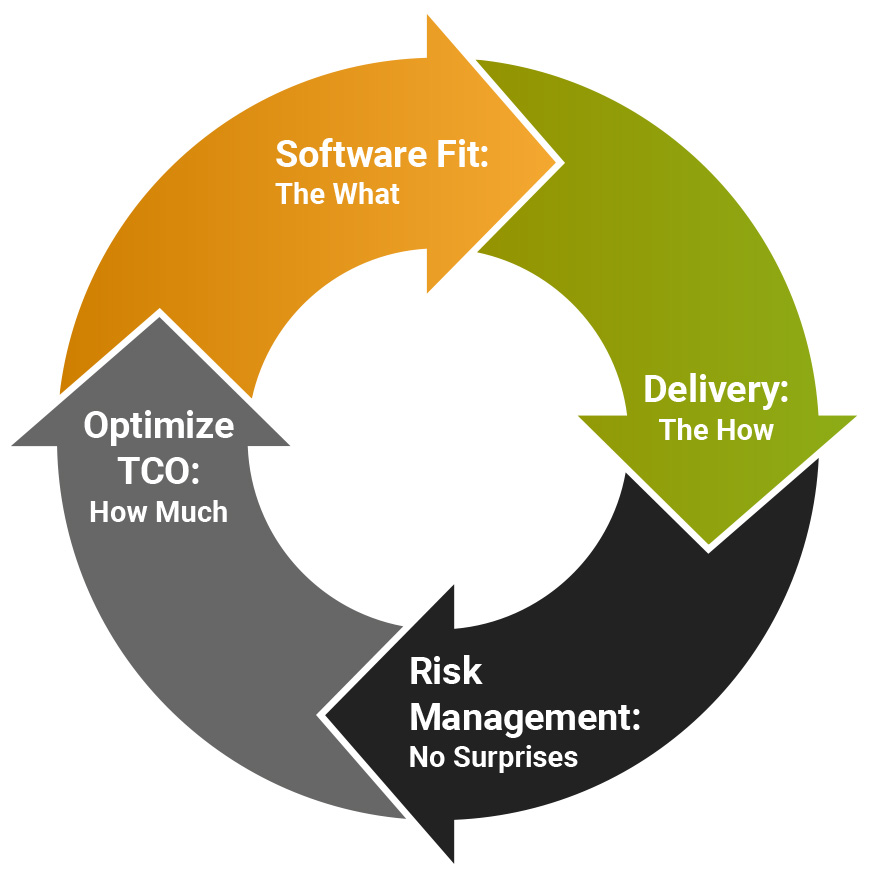
Evaluate software product fit

When assessing ERP options, start with evaluating how the solution aligns with your business needs and IT strategy. Focus on:

  • Functionality: Does the ERP meet your functional requirements? Be thorough ― vendors often claim their product excels universally, so ensure it suits your operations.
  • Usability: User adoption depends on ease of use. Assess the interface’s intuitiveness and the ability to manage data without heavy IT reliance. Poor usability can derail ERP success.
  • Compliance Management: Confirm the ERP supports IT controls, audit trails, electronic signatures, reporting, documentation, and role/access management to maintain compliance and proper segregation of duties.
  • Technical Architecture: Ensure the solution aligns with your IT strategy, focusing on flexibility, scalability, extensibility, and standard technologies (e.g., programming languages, databases, operating systems). Evaluate integration capabilities and support for open interfaces.

Solution provider’s implementation and support approach

The second cornerstone is to evaluate each solution vendor’s implementation and support approach. Key questions:

  • How well does the ERP implementation provider understand your requirements?
  • What is their ability to execute? Breadth and depth of capabilities?
  • What is the breadth and depth of their related services?
  • What is their implementation approach?
    • What is included?
    • What is not included?
    • What do they expect you to handle?
  • What is their post-go-live support approach?
    • How does it work?
    • What services do they provide?
  • Can they meet the desired project timeline?
  • Do they offer any other business relationship value-adds? (e.g., industry-specific templates, ongoing education programs or managed services)

Mitigate predictable risks

The third cornerstone focuses on addressing predictable risks tied to each solution. Simply hoping for the best isn’t a strategy. Be intentional and proactive in identifying and mitigating risks, such as:

  • Implementation delays
  • Data migration challenges
  • Change management and user adoption issues

When ERP solutions seem similar in other areas, risk mitigation often highlights the real differences between vendors.

Optimize TCO

The fourth cornerstone is conducting a thorough cost/benefit analysis to ensure a true apples-to-apples comparison. Consider:

  • Software costs: Beyond initial fees, account for upgrades, add-ons, and new modules as your business grows. Vendor discounts rarely extend to future expenses.
  • Implementation and customization costs: Include the time and resources needed to implement and tailor the ERP to your needs.
  • Ongoing maintenance and support: Factor in internal IT resources and external specialists for troubleshooting, upgrades and integrations.
  • Intangible costs: Consider downtime during implementation, training employees and potential disruptions from insufficient support.

While sunk costs (e.g., investments in current systems) can’t be recovered, they shouldn’t overshadow the focus on future value.

Determine your decision style

Finally, decide whether to take a top-down or bottom-up approach for your evaluation process. Each approach has its strengths and trade-offs, so align your decision style with your business goals, leadership preferences and timeline.

Top-Down Approach

This approach prioritizes speed and focuses on high-level business challenges. It’s ideal for organizations with strong executive leadership that values quick decision-making. 

Pros
Cons
  • Faster decision-making process, ideal for tight timelines
  • Keeps the focus on solving key business challenges
  • Encourages early executive buy-in
  • May overlook important details that arise during implementation
  • Relies heavily on accurate initial assumptions

Steps:

  • Create a shortlist of leading ERP providers for demos
  • Focus demos on key differentiators and top 10 must-see features for your business
  • Work with vendors to mitigate unforeseen risks

Bottom-Up Approach

This approach is more detailed and thorough, making it ideal for analytical stakeholders who want to minimize risk and address all requirements.

Pros
Cons
  • Provides a comprehensive understanding of vendor capabilities
  • Reduces the risk of missing critical requirements
  • Builds confidence among stakeholders by involving them in the process
  • Slower and more resource-intensive
  • Can overwhelm decision-makers with too much data

Steps:

  • Start with a broader list of ERP providers
  • Create a comprehensive requirement inventory
  • Request vendors map their capabilities to your requirements
  • Analyze vendor responses and proceed with the top-down steps

Which decision approach is right for you?

  • Choose top-down if speed is your priority, leadership prefers high-level focus, or you need early executive buy-in.
  • Choose bottom-up if your team values thoroughness, has the time for detailed evaluation or needs to build confidence among analytical stakeholders.

Congratulations! You are now ready to start researching and contacting ERP vendors.


Step 6: Research and Identify Viable ERP Solutions

With your ERP requirements in hand, start researching ERP solution vendors by gathering preliminary information, eliminating poor fits and qualifying those worth pursuing further. Use a variety of resources:

  • Your team’s ERP experience
  • Knowledgeable contacts and industry peers
  • Online research, vendor websites, white papers and analyst reports

Understand each vendor’s origin story — why it was built (which will speak to fit) and how they operate today — to assess alignment with your needs. Focus on evaluating:

  • Core functionality & features
  • Scalability & flexibility
  • Deployment options
  • Integration & compatibility
  • User experience & ease of use
  • Security & compliance
  • Implementation & deployment
  • Training & support
  • Cost & licensing
  • Vendor reputation & roadmap

ERP Vendor Comparison Checklist

Use this comprehensive checklist to evaluate major ERP providers. It includes key topics and critical questions to ask each vendor.

  1. Core Functionality & Features
    • Does the ERP system support key business processes (finance, HR, supply chain, manufacturing, CRM, etc.)?
    • How customizable are the core modules?
    • What industry-specific features or best practices does the ERP support?
    • How is AI built into the ERP, and how does it speed up processes?
    • Does it include built-in analytics and reporting?
  2. Scalability & Flexibility
    • Can the ERP scale with your company’s growth?
    • Does the system support multiple locations, currencies and languages?
    • What are the limits on data storage and transaction volumes?
  3. Deployment Options (Cloud vs. On-Premises)
    • Is the ERP available as a cloud, on-premises or hybrid solution?
    • What are the infrastructure requirements for on-premises deployment?
    • How frequently does the cloud version receive updates?
    • What are the backup and disaster recovery options?
  4. Integration & Compatibility
    • How well does the ERP integrate with existing software (CRM, HRIS, legacy systems)?
    • What APIs or third-party integrations are available?
    • Is there support for IoT, AI or automation tools?
  5. User Experience & Ease of Use
    • How intuitive is the user interface?
    • What kind of training is required for employees?
    • Is the ERP accessible on mobile devices?
    • Can workflows be easily customized for different user roles?
  6. Security & Compliance
    • What security measures does the ERP offer (encryption, access controls, audit logs)?
    • Does the ERP comply with industry regulations (GDPR, HIPAA, SOX)?
    • How frequently are security updates and patches released?
  7. Implementation & Deployment
    • What is the average implementation timeline?
    • What resources (internal and external) will be required?
    • Does the vendor provide an implementation roadmap?
    • What are the biggest challenges companies face during deployment?
  8. Training & Support
    • What training options are available (online, in-person, documentation)?
    • Is customer support available 24/7?
    • What is the SLA (service level agreement) for resolving issues?
    • Is there a dedicated account manager for ongoing support?
  9. Cost & Licensing
    • What is the pricing model (subscription, perpetual license, pay-per-user)?
    • Are there hidden costs (customization, support, training)?
    • What is the TCO over 3-5 years?
  10. Vendor Reputation & Roadmap
    • What is the vendor’s experience and market position?
    • How many consultants are certified in this solution? Any notable awards?
    • Are there case studies or references from similar businesses?
    • What is the future roadmap for the ERP system?
    • How often are new features and updates released?

Making comparisons

To ensure a like-for-like comparison, create a spreadsheet with key topics and questions to compare each vendor. While some ERP vendors may offer comparison tools, include your own specific “must-haves” and “need to know” to make sure your evaluation reflects your needs.

Your initial ERP research should narrow your list down to top contenders. Once you’ve identified them, it’s time to contact vendors and take the next step.


Step 7. Consider What Questions Vendors May Have for You

Before you connect with any ERP vendor directly, remember they’ll have questions for you, too. Be prepared to respond to the following questions:

  • Key business objectives: What are your primary goals for implementing an ERP?
  • Current solution: What system(s) are you using now, and what don’t you like about them?
  • Reasons for change: Why are you considering a new solution?
  • Competitor products: What other ERP solutions are you looking at?
  • User base: How many users will need access to the system?
  • Functional modules: Which modules are relevant to your business (finance, HR, supply chain)?
  • System interfaces: What are your integration requirements with existing systems?
  • Compliance: What regulatory or compliance requirements must the ERP meet?
  • Decision process: What is your decision-making process, criteria and timeline?
  • Project timing: When do you plan to start, and what’s your target go-live date?
  • Budget: What is your budget range?
  • Meeting attendees: Who will attend the next meeting (names and titles)?

Before booking ERP demos

Keep these tips in mind to ensure productive vendor meetings:

  • Include your core ERP team members. Include key team members in vendor meetings so you can address questions and provide data.
  • Discuss budget early. Be ready to talk about budget and price ranges on the first call. This saves time if the vendor’s cost is not a match.
  • Be honest and clear. Clearly communicate your needs, must-haves and nice-to-haves. Share how you anticipate scaling ERP usage over the next few years.

Step 8. Shortlist Vendors, Schedule Demos and Review Top Picks

After initial discussions with top ERP contenders, narrow your list by eliminating vendors that exceed your budget or lack key functionality and product fit. Then, schedule demos with your shortlist.

What to ask for in an ERP demo

Since most ERP vendors have comparable basic functionality, focus on your top 10 must-haves. Here’s how to make the most of your demos:

  • Provide sample data. Share sample data with vendors and ask them to demonstrate how their product will meet (or exceed!) your key business needs.
  • Discuss implementation. Have vendors explain their implementation methodology and approach during the demo.
  • Use a rating scorecard. Leverage a scorecard (like the one in this guide) to evaluate how their product aligns with your requirements. This will make it easier compared to ERP solutions later.

Post-demo review

Once you’ve completed your demos, filled out your rating scorecards and documented vendor discussions, it’s time to discuss the results with your ERP team. Focus on:

  • Key requirements: How well does each product support your must-haves?
  • Services provided: What services typically are and are not provided?
  • Interface and usability: Are there significant differences in ease of use?
  • Gaps or concerns: Identify any missing, confusing or conflicting information.
  • Timeline and implementation: Compare differences in project timelines and approaches.
  • Budget and costs: Review cost differences, including any hidden fees or long-term expenses.

Draw up a list of follow-up questions for vendors to clarify any concerns or gaps. Set a deadline for their responses, or schedule a final round of meetings to address outstanding questions.


Step 9. Refine Scope, Request Proposals and Review

After vendors address your questions, assess whether any responses prompt changes to your ERP requirements or approach. If adjustments are needed, provide your shortlist with a revised requirements list and request formal proposals.

Review proposals & select finalists

Carefully review proposals, paying close attention to vendors’ weekly implementation work plans. Focus on how each vendor handles:

  • Project management: How will they manage timelines, milestones and deliverables?
  • Requirements analysis: Do they fully understand your business needs?
  • Solution design: How will the ERP be tailored to your business needs?
  • Data migration: What is their approach to transferring and validating data?
  • User training: What training options are available, and who delivers them?
  • User acceptance testing: How will they ensure the system meets your expectations?
  • Go-live planning: What is their strategy for a smooth transition?
  • Ongoing support: What post implementation support is included?

Key considerations

  • Support assumptions: Vendors often differ in their assumptions about support levels. If a proposal is vague or has lower estimates, it may indicate they expect you to handle more tasks.
  • Clarify responsibilities: If any bid is unclear, ask for clarification on who handles what. Ensure you understand the division of responsibilities to avoid surprises later.
  • Bid structure: Pay close attention to how each bid is structured, especially around costs and deliverables.

Refine and finalize

Once you’ve reviewed all vendor proposals, identify the implementation approach — or specific elements — that best meet your needs. Then, direct each vendor to adjust their approach to match your requirements.

After you’ve received revised proposals, it’s time to name your ERP finalists.


Step 10. Select Finalists, Check References and Contract

This is the big moment! Congratulations! You and your team have done a ton of work and sorted through a lot of information. You’re so close to making a final decision.

Select your finalists

Choose your top two finalists and conduct one final evaluation by checking their references. Use this opportunity to validate your decision and gain insights from others who’ve worked with the vendor.

Questions to ask references:

  • Did you enjoy working with this ERP provider? Why or why not?
  • Did the project stay within budget?
  • Were there any surprises or anything that you weren’t aware of beforehand?
  • Were there any timeline complications?
  • Did the provider make any recommendations based on your industry?
  • What was the support like after the project?
  • How has the adoption rate been?
  • How do users like the product?

Make your final decision

Based on what you learn, all the data and feedback you’ve gained and a consensus among your team, select your ERP provider. Notify the vendor, agree on business terms and proceed with the contract.

And don’t forget to celebrate! You’ve accomplished a major milestone in your business’s transformation journey.


Avoid Common ERP Project Pitfalls

ERP projects can fail for many reasons, but knowing the common pitfalls helps you avoid them and set your project up for success.

Product pitfalls

  • A difficult interface leads to lower adoption
  • Hidden system integration issues disrupt workflows
  • Excessive customizations create unexpected costs and complexities
  • Managing disparate technologies strains resources
  • Vendors fail to innovate, leaving the ERP unable to keep up with advancements

People-driven pitfalls

  • Vague project plans and misaligned vendor expectations
  • Weak project execution or change management (lack of in-house or provider expertise)
  • Ineffective training reduces adoption and productivity

These risks are real, but with careful planning, clear communication and a strong team, you can avoid them and set your ERP project up for success.


Stop Putting Off Your ERP Decision

Selecting the right ERP for your business is career-defining. That's why it's important to get it right. Our award-winning software experts have helped hundreds of business leaders like you make the right choice and get the win. Learn how our ERP consultants can help you review requirements, shortlist the best solutions and make your ERP decision a success story.
Get Started

Centralize Your Data & Leverage End-to-End Insights

To learn more about modernizing your ERP, getting a project back on track or setting your business up for sustainable growth, schedule your complimentary ERP consultation.


Resources
Related News & Insights
7 Signs You’ve Outgrown Your Legacy Manufacturing Systems
Article
Know the warning signs that your legacy ERP is stunting business growth and preventing visibility.

March 04, 2026
ERP & CRM Integration: Key Business Benefits and How to Get Started
Article
These systems become more powerful for your business when they work together. Here’s why integration is worth it.

March 03, 2026
Growth Without the Growing Pains: Why ERP Is Key to M&A Success
Article
Growth shouldn’t be chaos. Discover how a modern ERP brings control and clarity to expansion.

December 05, 2025